
AI coding agents changed the shape of terminal work. A developer is no longer just typing commands into one shell, watching one build, or keeping one editor workflow in mind. It is increasingly normal to run several agents at once: one implementing a feature, one investigating a failing test, one reviewing a diff, and one parked in a separate worktree for an experiment.
That workflow technically fits inside a traditional terminal emulator. It does not fit well.
Tabs and split panes were designed around a human switching between a small number of interactive shells. AI coding agents create a different problem: long-running autonomous sessions, visible intermediate state, multiple branches of work, and a need to compare what each agent is doing without constantly reopening terminal history.
The problem is not terminal rendering
Most terminal tools compete on rendering quality, shell integration, startup speed, themes, or AI autocomplete. Those are useful, but they do not solve the coordination problem created by agentic development.
When multiple coding agents are running, the hard questions are spatial and operational:
- Which agent is waiting for input?
- Which worktree does this terminal belong to?
- Which session produced this diff?
- Which agent is safe to interrupt?
- Which branch of work should be merged, reset, or abandoned?
- What was the context behind this terminal state?
In a tabbed interface, the answer is usually hidden behind a label. In a split-pane interface, the answer disappears once there are more sessions than fit on screen. The user is forced to manage agent state mentally.
That works for a few minutes. It breaks down during long-running coding work.
Agent work is spatial
Human developers already use spatial memory to organize work. We leave a terminal on one monitor, documentation on another, a debugger in a corner, and a diff view somewhere stable. The position becomes part of the context.
AI coding agents benefit from the same treatment. A terminal running a review agent should not feel identical to a terminal running an implementation agent. A worktree for a risky experiment should not be visually interchangeable with the main feature branch. A completed session should remain available for inspection without occupying the same mental slot as an active one.
An infinite canvas makes that structure explicit:
- Terminals can be grouped by project, worktree, or task.
- Long-running agents can stay visible without fighting for one active pane.
- Related sessions can sit near each other, so comparisons are physical instead of purely textual.
- Stale or completed work can move away from the active area without disappearing.
This is not decoration. It is a way to reduce the hidden bookkeeping that multi-agent coding creates.
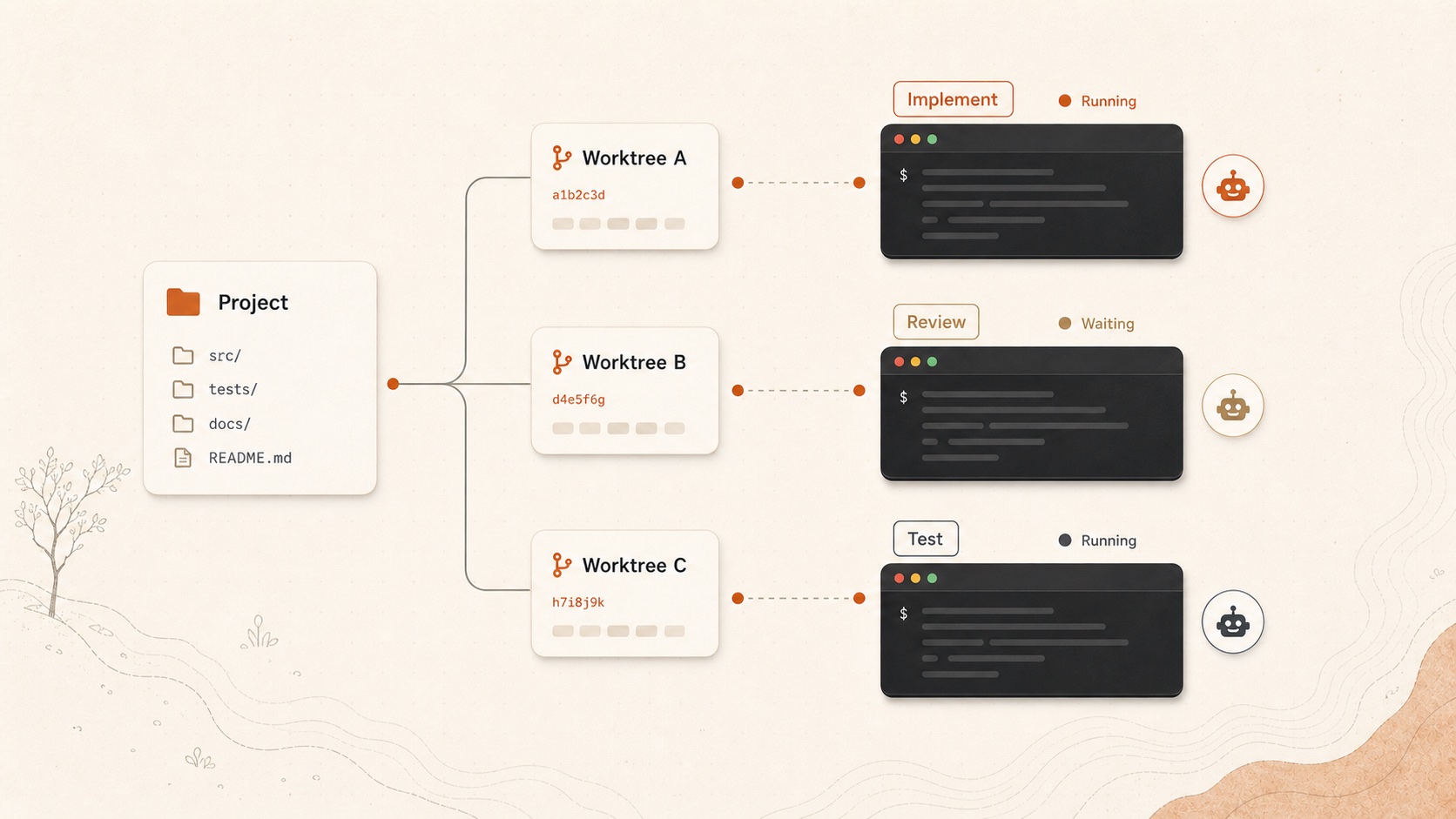
Worktrees become first-class workspace objects
Git worktrees are a natural fit for agentic development. They let different agents work on different branches without stepping on each other’s files. But most terminal interfaces treat a worktree as just another current working directory.
That is too weak.
In an agent workspace, the worktree is a boundary of responsibility. It tells you which filesystem state the agent can modify, which branch it belongs to, which diff it produced, and whether its output can be merged safely.
TermCanvas models that hierarchy directly:
Project -> Worktree -> TerminalThat structure matters because it prevents terminals from becoming detached from the code they affect. When an agent says it fixed a bug, the question is not only “what did it say?” The question is “which worktree changed, what diff exists there, and how does that relate to the rest of the project?”
Long-running agents need visible state
A traditional shell session is often short and interactive. Agent sessions are often long and asynchronous. They may spend minutes reading files, running tests, editing code, or waiting for the next instruction.
For that kind of work, visibility is not a luxury. It is how the human lead keeps control.
Useful visible state includes:
- Running, waiting, completed, and error states.
- The worktree and branch associated with the session.
- Recent activity and whether the agent needs attention.
- The surrounding sessions that provide context.
- The diff or artifact produced by the work.
If that state is buried in terminal prose, the user has to keep re-reading logs. If it is surfaced as workspace state, the user can make decisions faster.
The terminal is becoming an orchestration surface
The terminal used to be an input/output surface for one user. With AI coding agents, it is also becoming an orchestration surface. The user is no longer only typing commands; they are assigning work, observing progress, deciding when to intervene, and merging or rejecting outputs.
That requires a different interface shape.
TermCanvas is built around that shift. It keeps terminals real, because agents still need real shells, real processes, and real repositories. But it adds the missing layer around them: spatial organization, worktree-aware context, unified input, visible session state, and Hydra for structured multi-agent workflows.
The goal is not to replace the terminal. The goal is to make the terminal usable when one human is supervising many coding agents at once.